Directory app
A Commerce app for a Listeo or MyListing WordPress site: places on Home and a map, listing pages, reviews, Listeo bookings and owners' listings. With WooCommerce keys, the shop stays too.
Updated Oct 23, 2026
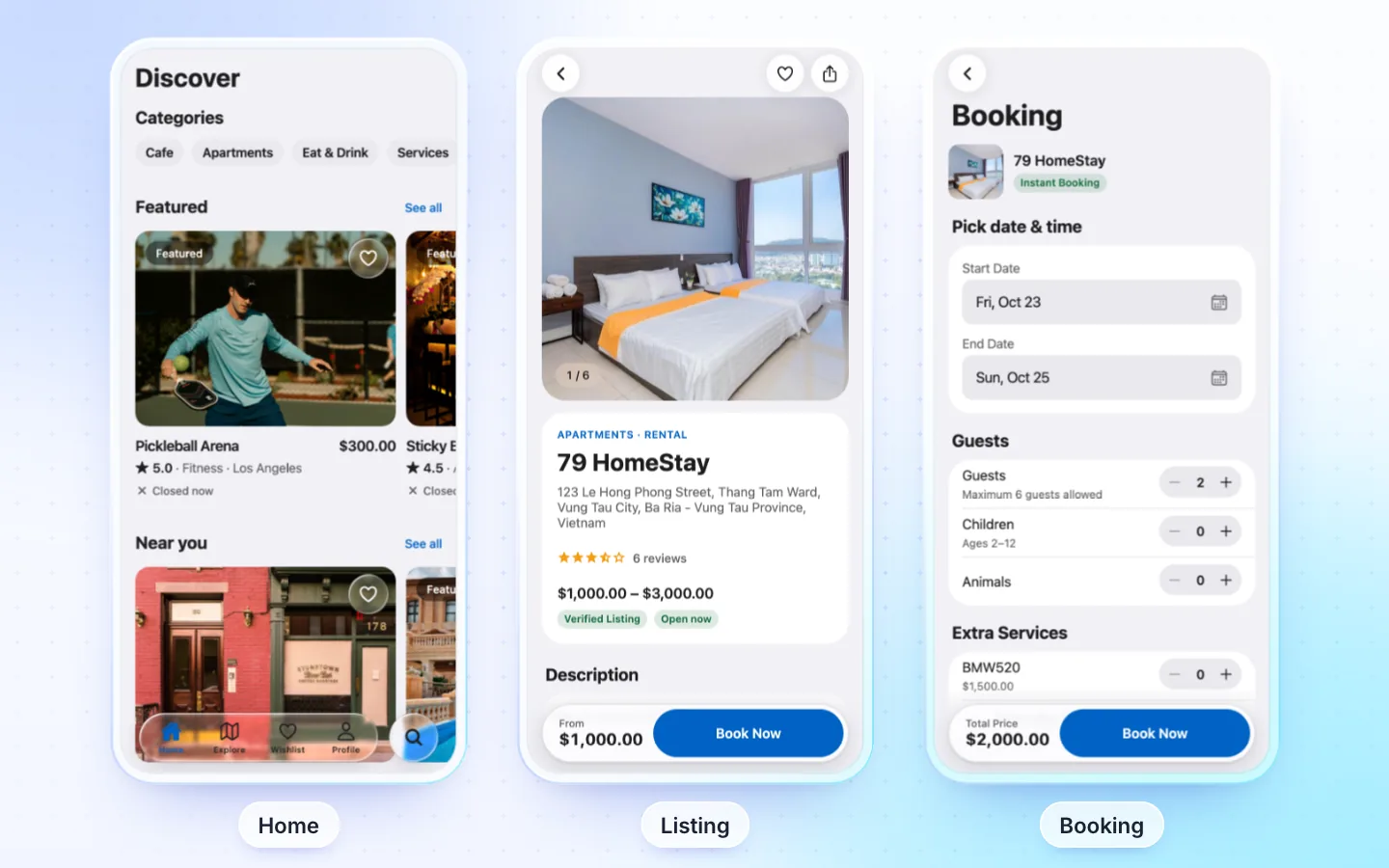
What it has
- Home: rows of featured places, by category or region, places nearby, and a map.
- Explore: a map or a list, with filters by category and region, and sorting.
- A listing: photos, rating, description, features, opening hours, price, location, price list, questions, video, the owner and event dates, with Call, Website, Email and Direction.
- Reviews, and Write a review for a signed-in person when
writeReviewsis on. - Saved places on the phone, places nearby and search.
- Listeo bookings: dates, time slot, guests and extras, then a booking request, or its order paid when the site has a shop: Pay Now pays it in the app with Stripe or Tap, with the FluxNative plugin; else on your shop's page. Pay Now hides once the time to pay is over or for a cash-only listing. My bookings lists them with cancel and tickets.
- Owners: My listings shows their listings, in every status with the FluxNative plugin (published only without it); on Listeo, owners sign up in the app.
- AI assistant that finds places and books them, and messages with owners, with the FluxNative plugin. It also shows each time slot's free places, and a booking is paid in the app.
Listing kinds
| Theme | Listing kinds | Bookings |
|---|---|---|
| Listeo | Service, rental, event and classifieds; each card shows its own fact ("$90 / night", the event date) | Service, rental and event |
| MyListing | Your site's own listing types and fields | No |
On MyListing, set nearbyListingType in src/config/listing.ts to the type Nearby Places searches.
Required plugins
| Plugin | Needed | What for |
|---|---|---|
| Listeo (with Listeo Core) or MyListing | Required | Listings, maps and reviews |
| FluxNative | Recommended | Listings with every field your site maps, Listeo bookings with slots, paying in the app and tickets, owners' listings in every status, the AI assistant and messages |
| WooCommerce and a Read REST API key | Optional | A shop, and paid Listeo bookings |
How it connects
- Live from your site through its REST API and the FluxNative plugin: products, posts, listings and orders stay on your site, with nothing to copy or sync.
- FluxNative plugin for WordPress: the app's backend, plus the AI assistant, a chat bubble on your site and a site health check. FluxNative for WordPress. Not on wordpress.org yet: download the zip, then in WP admin choose Plugins › Add New › Upload Plugin.
- Installed later? The app checks your site when it starts, so it moves to the plugin at its next start, with no new build. Shoppers then sign in once more.
Not supported
- Adding or editing a listing in the app, and owners seeing or confirming bookings: no screens for them yet.
- Bookings on MyListing.
- ListPro, and Listeo with Dokan.
Make one
- From FluxBuilder: choose Create app › From a FluxBuilder app and upload your Listeo or MyListing app's files. The report says whether the shop stays.
- From the template: choose Start from the template › Directory, pick Listeo or MyListing, keep With a shop for a WooCommerce shop, and enter your site's address.
Settings
src/config/listing.ts | What it does |
|---|---|
platform | listeo or mylisting |
nearbyRadiusKm | How far Nearby Places looks, 10 km by default |
writeReviews | Signed-in people write reviews |
nearbyListingType | MyListing only: the listing type Nearby searches |
Related
Did this page help?