WooCommerce store app
A Commerce app for any WooCommerce store: its catalog, cart, checkout and orders, live from the store. What it has, the product types it sells, the plugins it needs and the ones it works with.
Updated Oct 24, 2026
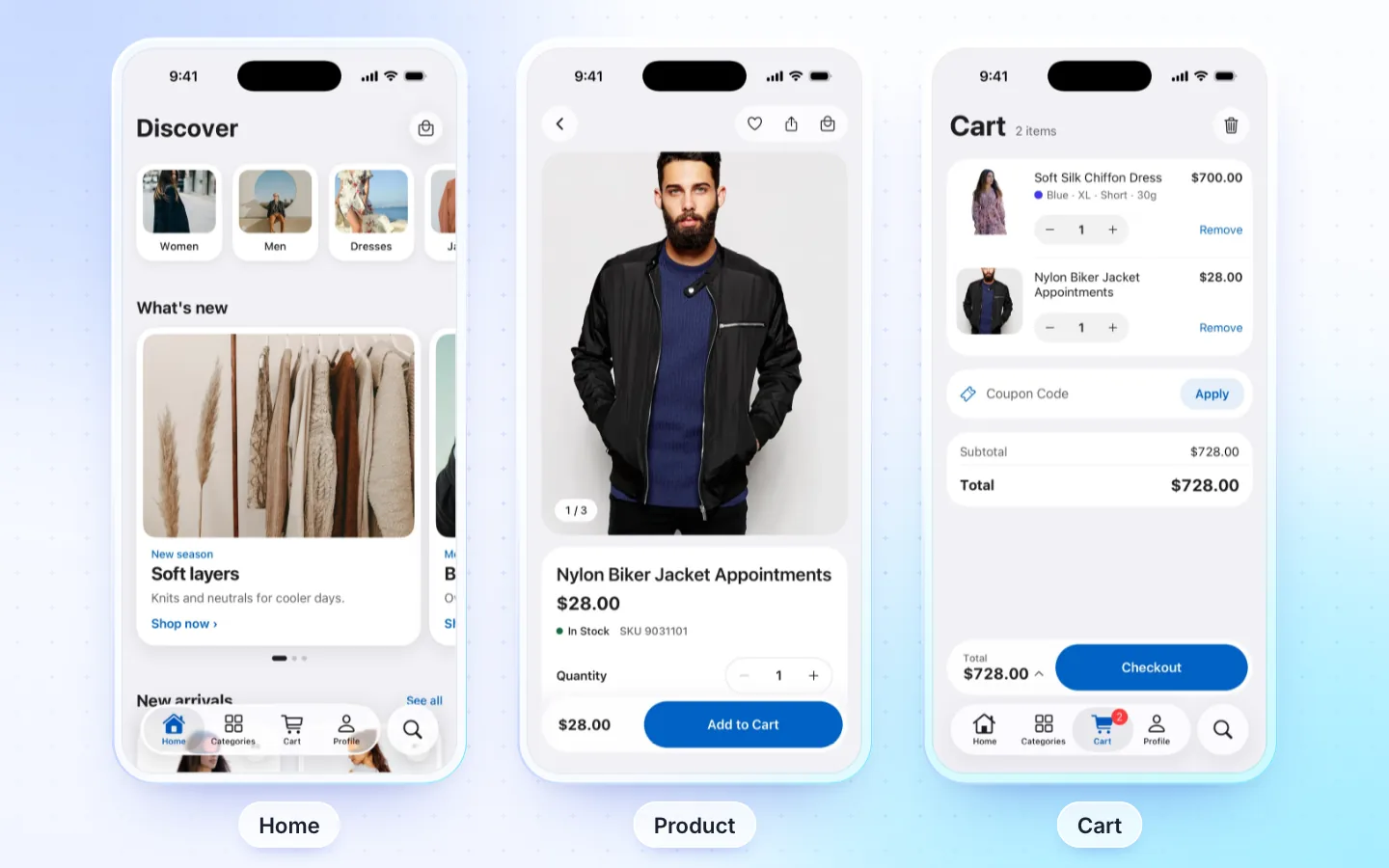
What it has
- Home: banners, category tiles, product rows and flash sales, from your own categories.
- Catalog: categories, filters by price, brand, tag and attribute, search by name or SKU, and a wishlist on the phone.
- Product page: photo gallery, variations, stock, reviews, related products and sharing.
- Cart and checkout: coupon codes and a coupon list, shipping address, guest checkout. Bank transfer and cash on delivery place the order in the app.
- Pay in the app, with the FluxNative plugin: a signed-in shopper pays with Stripe or Razorpay on your store's own pay page inside the app, or with Tap or MyFatoorah on their own page over the app. The order is marked paid once, at its exact total. Every other payment opens a web page: your site's checkout or the gateway's.
- Orders and account: order history by status, the order timeline, re-order, cancel or ask for a refund, my reviews, my subscriptions, delete account.
- Sign in: e-mail and password, Google and Apple (with your app's own sign-in keys), password reset.
- AI assistant that finds products, reads your size charts, compares, adds several items at once, suggests what goes with them and helps with orders (more), messages with the store, and the cart in sync with your website (when the store turns on Sync carts), with the FluxNative plugin.
- Automated pushes, with the FluxNative plugin, each off until you turn it on in WordPress (FluxNative › Mobile app › Notifications › Automations): a reminder of a cart left behind, back in stock after a shopper taps Notify me, and price drops on wishlist items. You set quiet hours, a daily cap per shopper and the texts per language; shoppers turn reminders and price drops off in the app's Notifications.
Product types
| WooCommerce type | In the app |
|---|---|
| Simple | Yes |
| Variable | Yes: each attribute as chips or swatches, the variation's price, stock and photo. Options that don't sell with your picks are greyed, sold-out ones struck through; the last option left is chosen for you, and Clear empties the picks; "Any" options go with the order |
| Grouped | Yes: its own products, each with a quantity |
| External / affiliate | Yes: the button opens the product's link |
| Bundles (WooCommerce Product Bundles) | Yes, with the FluxNative plugin: its items with their quantities, optional ones, discounts and options; your store's cart prices it, and the cart and order list its items |
| Gift cards (PW WooCommerce Gift Cards) | Yes, with the FluxNative plugin: its amounts, who it is for, from whom and a message; your store makes and e-mails the card. Gift card numbers are redeemed at checkout |
| No price, auctions | Shown, not sold in the app |
| Subscriptions (WooCommerce Subscriptions) | With the FluxNative plugin: the price with its period, trial and sign-up fee, recurring totals at checkout, paid on your store's pay page, and My subscriptions in Account to see renewals, pause, resume or cancel. Without it, the button opens the product on your site |
| Bookings, appointments, other bundle plugins, composite | The button opens the product on your site |
Leave products the app can't sell out of it with excludedProductIds in src/config/wooStore.ts.
Required plugins
| Plugin | Needed | What for |
|---|---|---|
| WooCommerce | Required | Products, cart and orders |
| FluxNative | Recommended | Sign in, checkout, orders, cart sync with your website, the AI assistant and messages |
| REST API key | Recommended | The coupon list and my reviews. Connect with WooCommerce makes it; a seller or driver app asks Read/Write. |
How it connects
- Live from your site through its REST API and the FluxNative plugin: products, posts, listings and orders stay on your site, with nothing to copy or sync.
- FluxNative plugin for WordPress: the app's backend, plus the AI assistant, a chat bubble on your site and a site health check. FluxNative for WordPress. Not on wordpress.org yet: download the zip, then in WP admin choose Plugins › Add New › Upload Plugin.
- Installed later? The app checks your site when it starts, so it moves to the plugin at its next start, with no new build. Shoppers then sign in once more.
Supported plugins
- Payment gateways: with the FluxNative plugin, Stripe and Razorpay pay on your store's own pay page inside the app, and Tap and MyFatoorah on their own page over the app. Other gateways pay on a web page: your site's checkout or the gateway's.
- WPML, Polylang, TranslatePress: with the FluxNative plugin, products, categories, search, posts, checkout notices and order e-mails in the app's language, and the cart follows a language change. Without the plugin, WPML only with a REST API key on an HTTPS site.
- GTranslate, Weglot: the app's own screens follow its language; store content stays in the site's language.
- WOOCS, CURCY, WPML Multilingual & Multicurrency for WooCommerce (WCML), WooPayments Multi-Currency: with the FluxNative plugin, shoppers pick a currency in Account › Currencies. Products, cart, checkout and the order are in it, at your site's rates. Without the plugin, prices show in your store's own currency.
- TeraWallet, with the FluxNative plugin: a signed-in shopper sees My Wallet on Profile: the balance, Top Up with your gateways, Transfer to another account by e-mail and the history. At checkout the wallet pays the whole order, or the part its balance covers where TeraWallet allows it, and checkout shows the cashback the order earns. Withdrawals open your website.
- Price Based on Country (version 4.0 or later): with the FluxNative plugin, prices follow the shopper's country. Shoppers pick it in Account › Country, and checkout prices the order for its address's country.
- WooCommerce Subscriptions, with the FluxNative plugin: the price with its period, trial and sign-up fee, recurring totals at checkout, paid on your store's pay page (the card is kept for renewals), and My subscriptions in Account.
- WooCommerce Product Add-Ons, YITH Product Add-Ons, PPOM, with the FluxNative plugin: add-ons on the product page, priced by your store's cart, changed from the cart with Edit. A file upload is added on your site.
- WooCommerce Product Bundles, with the FluxNative plugin: a bundle's items on its page with their quantities, optional ones, discounts and options (your swatches too), its price as your store sets it, and its items in the cart, checkout and the order. Items you hide in the cart or order stay hidden.
- PW WooCommerce Gift Cards, with the FluxNative plugin: a gift card's amounts on its page with who it is for (one card per e-mail), from whom and a message; your store makes and e-mails the card when the order is complete. At checkout, a gift card number beside the coupon takes what it can off the total, and Check balance reads a card's balance. Pro's custom amounts and delivery dates are not offered.
- Variation swatches (Variation Swatches for WooCommerce, WCBoost, CartFlows): with the FluxNative plugin, your colours (two-colour too), pictures, size labels, shape, size and tooltips, in your option order. Without it, Variation Swatches for WooCommerce colours and pictures with the MStore API.
- Variation Gallery and similar plugins: a colour's own extra photos in the gallery once it is chosen, with the FluxNative plugin.
- Photo Reviews: shoppers' photos in reviews.
- Min/Max Quantities: minimums, maximums and groups of (5, 10, 15) on the product page and in the cart.
- WooCommerce Brands: the brand filter and badges.
Not supported
- Native card payment sheets (Stripe, Razorpay): those gateways pay on your store's pay page inside the app.
- Barcode scanning: the search screen's button says it isn't available yet.
- Messages, cart sync and store pushes without the FluxNative plugin.
- A store manager app for a plain WooCommerce store: WooCommerce's own app does it.
- Store content in the app's language without the FluxNative plugin (WPML with a REST API key on an HTTPS site aside). The app's own screens still follow its language.
- A currency choice where the store charges only its own currency (WOOCS or CURCY set to pay in the default currency): the app stays in it.
Make one
Choose Create app › Start from the template › WooCommerce store, or bring a FluxStore app with From a FluxBuilder app. Create a Commerce app
Related
Did this page help?