Marketplace app
A Commerce app for a Dokan or WCFM marketplace on WooCommerce: every vendor, their stores and products, and the sellers' own area. What it has, the plugins it needs and the ones it works with.
Updated Oct 24, 2026
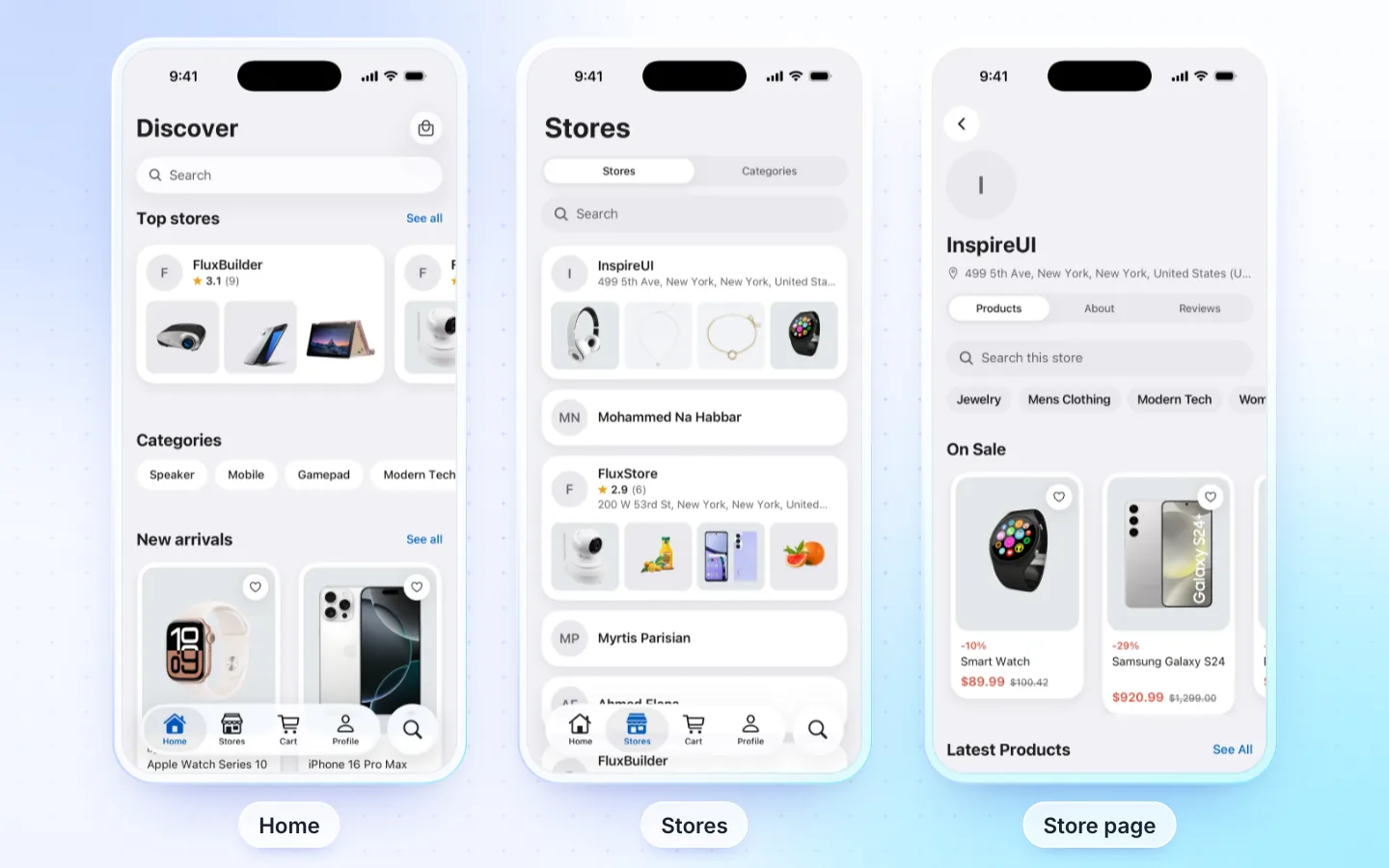
What it has
- Everything in the WooCommerce store app: catalog, filters, coupons, checkout and orders.
- Vendors: the store list, each store's page with its products, reviews and policies, featured stores on Home, and the vendor on products and in the cart.
- Sellers' area: a signed-in seller opens their store from Profile: orders, products and reviews (the seller app's screens).
- Sign up as a customer or a seller.
- AI assistant that finds products and knows each seller's shipping time (more), and messages with sellers, with the FluxNative plugin.
Products are WooCommerce's: the same product types.
Required plugins
| Plugin | Needed | What for |
|---|---|---|
| WooCommerce | Required | Products, cart and orders |
| Dokan or WCFM Marketplace | Required | Vendors, their stores and products |
| FluxNative | Recommended | Sign in, checkout, orders, the sellers' area, the AI assistant, messages and live chat links |
| REST API key | Recommended | The coupon list and my reviews. Connect with WooCommerce makes it; a seller or driver app asks Read/Write. |
The store must list its sellers with the plugin you pick when you make the app: Dokan or WCFM.
How it connects
- Live from your site through its REST API and the FluxNative plugin: products, posts, listings and orders stay on your site, with nothing to copy or sync.
- FluxNative plugin for WordPress: the app's backend, plus the AI assistant, a chat bubble on your site and a site health check. FluxNative for WordPress. Not on wordpress.org yet: download the zip, then in WP admin choose Plugins › Add New › Upload Plugin.
- Installed later? The app checks your site when it starts, so it moves to the plugin at its next start, with no new build. Shoppers then sign in once more.
Supported plugins
- Dokan Live Chat, WCFM chat: they stay on your site; store pages link to them, with the FluxNative plugin.
- Payment gateways: every one your checkout runs, paid on a web page: your site's checkout or the gateway's.
- WPML, Polylang, TranslatePress: with the FluxNative plugin, products, categories, search, posts, checkout notices and order e-mails in the app's language, and the cart follows a language change. Without the plugin, WPML only with a REST API key on an HTTPS site.
- GTranslate, Weglot: the app's own screens follow its language; store content stays in the site's language.
- WOOCS, CURCY, WPML Multilingual & Multicurrency for WooCommerce (WCML), WooPayments Multi-Currency: with the FluxNative plugin, shoppers pick a currency in Account › Currencies. Products, cart, checkout and the order are in it, at your site's rates. Without the plugin, prices show in your store's own currency.
- TeraWallet, with the FluxNative plugin: a signed-in shopper sees My Wallet on Profile: the balance, Top Up with your gateways, Transfer to another account by e-mail and the history. At checkout the wallet pays the whole order, or the part its balance covers where TeraWallet allows it, and checkout shows the cashback the order earns. Withdrawals open your website.
- Price Based on Country (version 4.0 or later): with the FluxNative plugin, prices follow the shopper's country. Shoppers pick it in Account › Country, and checkout prices the order for its address's country.
- WooCommerce Subscriptions, with the FluxNative plugin: the price with its period, trial and sign-up fee, recurring totals at checkout, paid on your store's pay page (the card is kept for renewals), and My subscriptions in Account.
- WooCommerce Product Add-Ons, YITH Product Add-Ons, PPOM, with the FluxNative plugin: add-ons on the product page, priced by your store's cart, changed from the cart with Edit. A file upload is added on your site.
- WooCommerce Product Bundles, with the FluxNative plugin: a bundle's items on its page with their quantities, optional ones, discounts and options (your swatches too), its price as your store sets it, and its items in the cart, checkout and the order. Items you hide in the cart or order stay hidden.
- PW WooCommerce Gift Cards, with the FluxNative plugin: a gift card's amounts on its page with who it is for (one card per e-mail), from whom and a message; your store makes and e-mails the card when the order is complete. At checkout, a gift card number beside the coupon takes what it can off the total, and Check balance reads a card's balance. Pro's custom amounts and delivery dates are not offered.
- Variation swatches (Variation Swatches for WooCommerce, WCBoost, CartFlows): with the FluxNative plugin, your colours (two-colour too), pictures, size labels, shape, size and tooltips, in your option order. Without it, Variation Swatches for WooCommerce colours and pictures with the MStore API.
- Variation Gallery and similar plugins: a colour's own extra photos in the gallery once it is chosen, with the FluxNative plugin.
- Photo Reviews: shoppers' photos in reviews.
- Min/Max Quantities: minimums, maximums and groups of (5, 10, 15) on the product page and in the cart.
- WooCommerce Brands: the brand filter and badges.
Not supported
- Messages between shoppers and sellers without the FluxNative plugin.
- Listeo with Dokan, and multi-site marketplaces.
- Store content in the app's language without the FluxNative plugin (WPML with a REST API key on an HTTPS site aside). The app's own screens still follow its language.
- A currency choice where the store charges only its own currency (WOOCS or CURCY set to pay in the default currency): the app stays in it.
Related
Did this page help?