Seller app
Sellers on a Dokan or WCFM marketplace run their store in a Commerce app: dashboard, orders, products, inventory, coupons, payouts and store settings. Inside the marketplace app, or as its own app on the same site.
Updated Oct 23, 2026
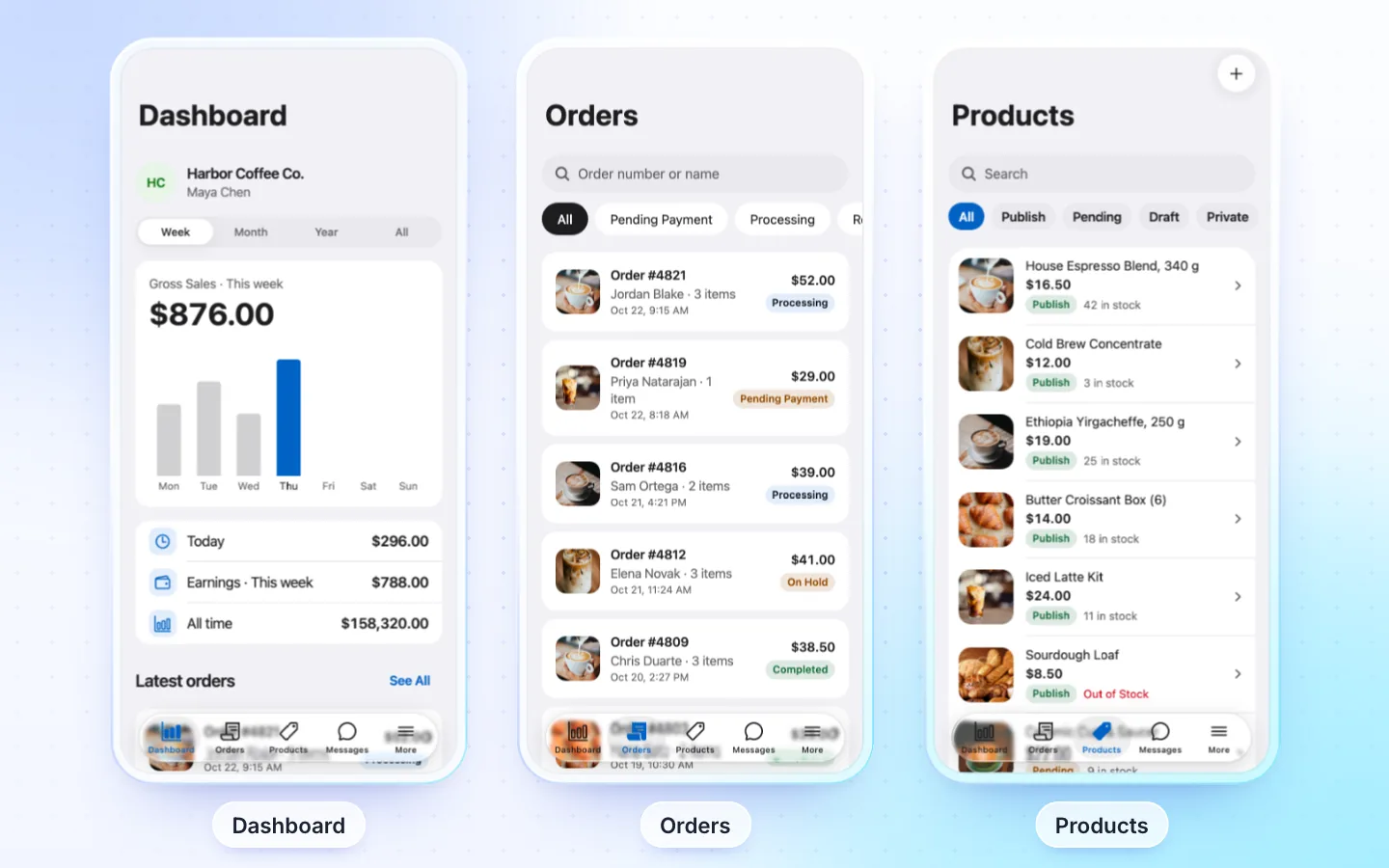
What sellers get
- Dashboard: To do (orders to ship, unpaid, on hold, low stock, reviews to approve; each opens its list), shortcuts, sales and earnings by week, month, year or all time, the balance with Withdraw, and the latest orders. Blocks you can turn on: earnings and fee, five weeks, orders by status, best sellers, low stock, latest reviews.
- Orders: by status, with search. Open one for its items, customer and address, the next step (Start processing, Mark completed; an unpaid order says Awaiting payment), a new status, a driver, Notes (private or sent to the customer), Add tracking (carrier and number, mailed to the customer) and Share invoice (print or PDF on the web).
- Products: add and edit with photos from the camera (cropped square) or library, simple or variable, prices, sale price, stock, SKU, categories, tags, attributes and variations; Duplicate, delete. Filter by status, Low stock or Sold out; Select several to publish, hide or delete at once.
- Inventory: low, sold out or all, with a stepper and Save per product.
- Coupons: a code (or Generate), percent or per product, end date, minimum spend, use limits, free shipping where the marketplace allows it, use alone, on all your products or some. Where the marketplace reviews coupons, a new one shows Pending review.
- Payouts: the balance, open requests, the minimum and the waiting days, Request payout with the method, and the history.
- More: store settings (name, logo, banner, phone, about, address), inventory, coupons, payouts, reviews, notifications and Back to Shop.
- Seller sign up from the app. With the FluxNative plugin, the AI assistant for their own sales and an Inbox of buyers' messages.
Required plugins
| Plugin | Needed | What for |
|---|---|---|
| Dokan or WCFM Marketplace | Required | The marketplace the sellers sell on, on WooCommerce |
| FluxNative | Recommended | Dashboard, orders with notes, products, reviews, store settings, the AI assistant and messages |
| Local Delivery Drivers for WooCommerce or WCFM Delivery | Optional | Assigning a driver to an order |
Seller accounts: a Dokan seller with selling on, or a WCFM vendor. A new seller waits for the store's approval.
How it connects
- Live from your site through its REST API and the FluxNative plugin: products, posts, listings and orders stay on your site, with nothing to copy or sync.
- FluxNative plugin for WordPress: the app's backend, plus the AI assistant, a chat bubble on your site and a site health check. FluxNative for WordPress. Not on wordpress.org yet: download the zip, then in WP admin choose Plugins › Add New › Upload Plugin.
- Installed later? The app checks your site when it starts, so it moves to the plugin at its next start, with no new build. Shoppers then sign in once more.
Supported plugins
- WCFM: review approval, notifications and vacation mode. On Dokan these three are not in the app: Dokan's routes don't do them.
- Payouts: Dokan (an amount, one open request at a time) and WCFM (everything ready, to the seller's payment method). Sellers set up their method on the website.
- Coupons: WCFM where its capabilities allow them, and Dokan with Dokan Pro. No fixed amount off the whole cart: on a marketplace cart it would come off other sellers' items.
- Local Delivery Drivers for WooCommerce, WCFM Delivery: assign a driver to an order.
Not supported
- A seller app for a plain WooCommerce store (no marketplace): WooCommerce's own app does it.
- A picture or SKU per variation: not in the app yet.
- Formatting in descriptions: sellers edit plain text. A description left as it was keeps its formatting.
- The Inbox and the assistant without the FluxNative plugin.
- Without the FluxNative plugin: the To do counts, notes, tracking, Duplicate, Select, the stock filters, coupons and payouts (the app says so in one line).
- Refunds, customer lists and replies to reviews: on the website.
Turn it on in the marketplace app
FluxBuilder (vendorConfig) | The app (src/config/apps.ts) | What it does |
|---|---|---|
DisableNativeStoreManagement: false | seller.enabled | Sellers open their store in the app |
VendorRegister: true | seller.signUp | Sign Up's Register as offers Vendor |
NewProductStatus | seller.newProductStatus | A new product's status: draft, pending or publish |
DisableVendorAddAttribute: true | seller.attributes: false | No attributes or variations |
- A migrated FluxBuilder app takes these from its
env.dart; a marketplace from the template has them on. - An app keeps only the areas that were on when it was made: one made with the seller area off has no seller code, and it can't be turned on later. Make a seller app for it.
- Add Vendor Admin (
vendorAdmin) to the Profile rows (src/config/account.tssettings). A signed-in seller then sees it in Profile.
Its own seller app
A site's shopper app, seller app and driver app are apps of the same website, so they use the same site: no other purchase.
- From FluxBuilder: a Vendor Admin (
vendorAdmin) app migrates as a seller app. Choose Create app › From a FluxBuilder app and upload its files. - From the template: choose Create app › Start from the template, then Seller app, its plugin and your store's address.
The seller app opens on sign in, then shows its own tabs.
Related
Did this page help?