Server
Server, on the project bar, holds the app's backend, payments and secret keys. Enter credentials once; the assistant uses them without seeing them.
Updated Oct 19, 2026
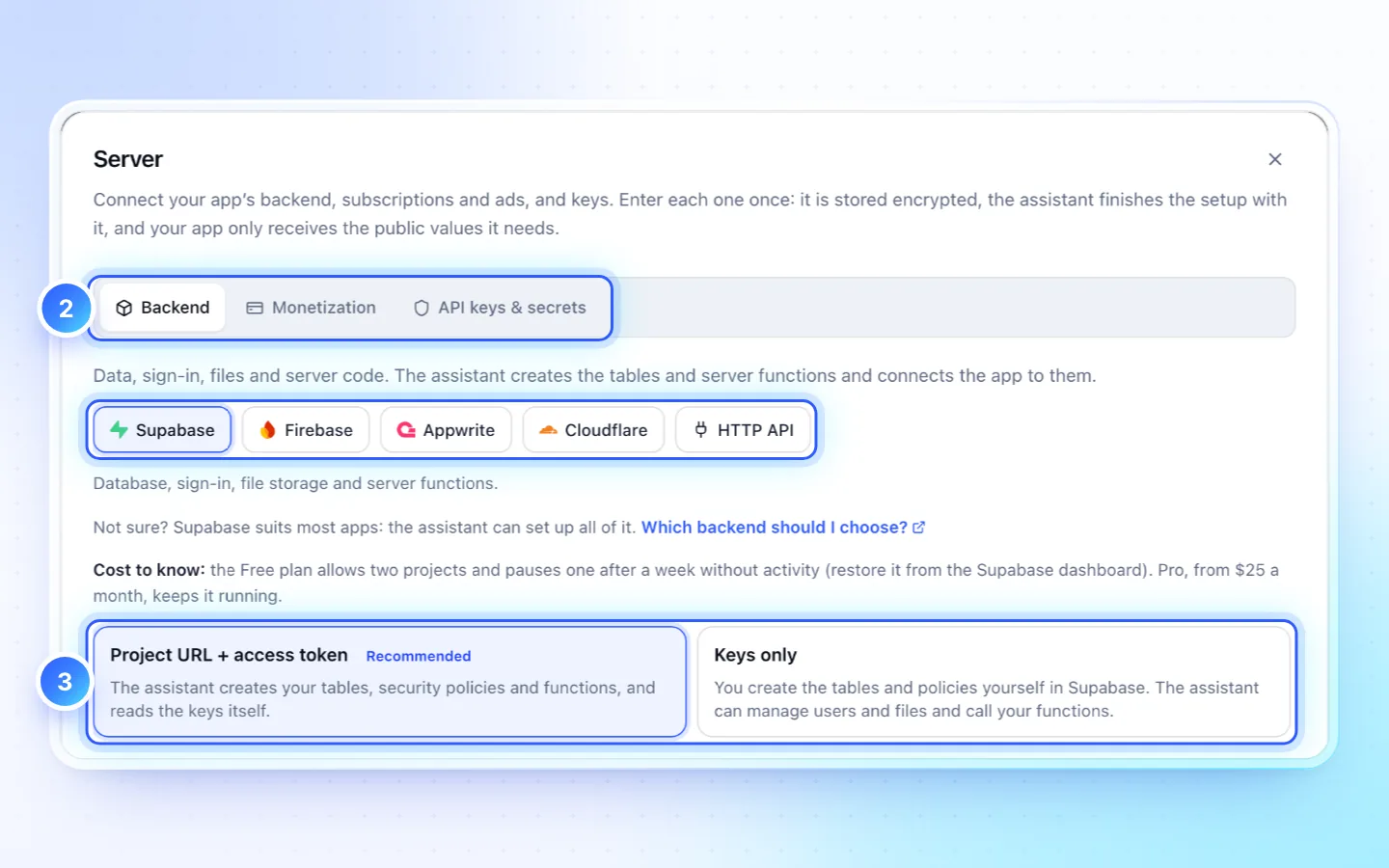
Steps
- Click Server in the project bar.
- Pick a tab, Backend, Monetization or API keys & secrets, then a provider.
- Follow its short walkthrough, fill in the form and save. Values are stored encrypted. A wrong URL or key prefix is named as you type; Cancel closes without saving.
- Ask the assistant in chat to use the connection. It creates tables and functions and adds the public values to the app.
Which backend should I choose?
Most apps should start with Supabase: free to start with no card, sign-in included, and the assistant creates its tables, security rules and functions. Choose Firebase when the app already uses it, Appwrite for open source or your own server, and HTTP API when a store, site or backend already exists (WooCommerce, WordPress, Shopify or your own API). Cloudflare has no database or sign-in, so it never replaces one of them for bookings, orders or accounts.
| Backend | Free to start? | Card needed? | Sign-in built in | The assistant sets up | Where data lives |
|---|---|---|---|---|---|
| Supabase | Yes; a Free project pauses after 7 days without activity | No | Yes: email, magic link, Google, Apple | Tables, row-level security, functions and their secrets (with the access token) | The region you pick when creating the project |
| Firebase | Yes: Firestore and sign-in | Only for file storage and Cloud Functions (Blaze plan) | Yes: email, Google, Apple, phone | Security rules, the app's config, Secret Manager; you create the database and turn sign-in on | The Firestore location you pick |
| Appwrite | Yes, with usage limits | No | Yes: email, OAuth providers | Tables, columns, indexes, storage buckets and the app's platforms | The Appwrite Cloud region you pick, or your own server |
| Cloudflare | Yes: 100,000 Worker requests a day | For R2 file storage | No; it has no database either: pair it with Supabase or Firebase for bookings, orders and accounts | Workers and KV storage | Cloudflare's network |
| Your store, site or API | Whatever its host charges | Depends on its host | Through your store's or API's own login | Reads your products, posts or endpoints while it builds; asks before changing anything | Where your WooCommerce, WordPress, Shopify or API runs |
Costs
| Provider | Cost to know |
|---|---|
| Supabase | Free: two projects, one paused after a week idle. Pro from $25 a month. |
| Firebase | Free to start. Storage, Functions and Secret Manager need Blaze. |
| Appwrite | Cloud Free plan with limits; self-hosted costs its hosting. |
| Cloudflare | Workers free: 100,000 requests a day. R2 needs a payment method. |
| Your store, site or API | Its host's price. The assistant asks before it changes anything there. |
| RevenueCat | Free until $2,500 a month of tracked revenue. Stores keep 15–30%. |
| AdMob | Free; Google pays past its payment threshold. |
Good to know
- No backend yet? The app runs on sample data on the phone and nothing syncs. Add one when people sign in or share data.
- Connecting is a chat turn that costs credits. A project holds one connection of each kind, except up to four HTTP APIs.
- What people enter lands in your provider, such as Supabase's Table Editor.
- A connected backend's row links to the provider's console, opens the Security check of its live rules (Creator and up), and lists any Supabase sign-in setting that would stop email sign-in on a phone, with Ask the assistant to fix. Connected editors with backend tools change it as you.
- Add or replace a backend: saving the same provider replaces the connection; another provider adds a second backend, which most apps never need.
- A replacement is checked first: Save and test asks the provider about the new key before saving it. If the provider refuses it, nothing is replaced and the previous key stays in use.
- Public values go in the app's
.env; secrets stay on the server.
Moving from sample data
- Catalog data the app made up (services, staff, products, opening hours) becomes your starting rows in the backend, to edit there. Ask the assistant when it connects the app.
- Sample bookings, orders or messages are never copied, and what people entered on their own phones before stays on those phones.
- Test data: while it checks its work, the assistant may create a test user (an address ending in
@example.invalid) and test rows in your real project. Its reply names them; delete them in the provider's dashboard. - How customers book or order, with an account or as a guest with a name and phone number, is your choice: the assistant asks before it adds sign-in.
- You see what arrives in the provider's dashboard; a staff-only screen in the app is a later change you can ask for.
Related
Did this page help?