Driver app
Drivers see and deliver their orders in a Commerce app, on WooCommerce, Dokan or WCFM with a delivery plugin. Inside the store app, or as its own app on the same site.
Updated Oct 23, 2026
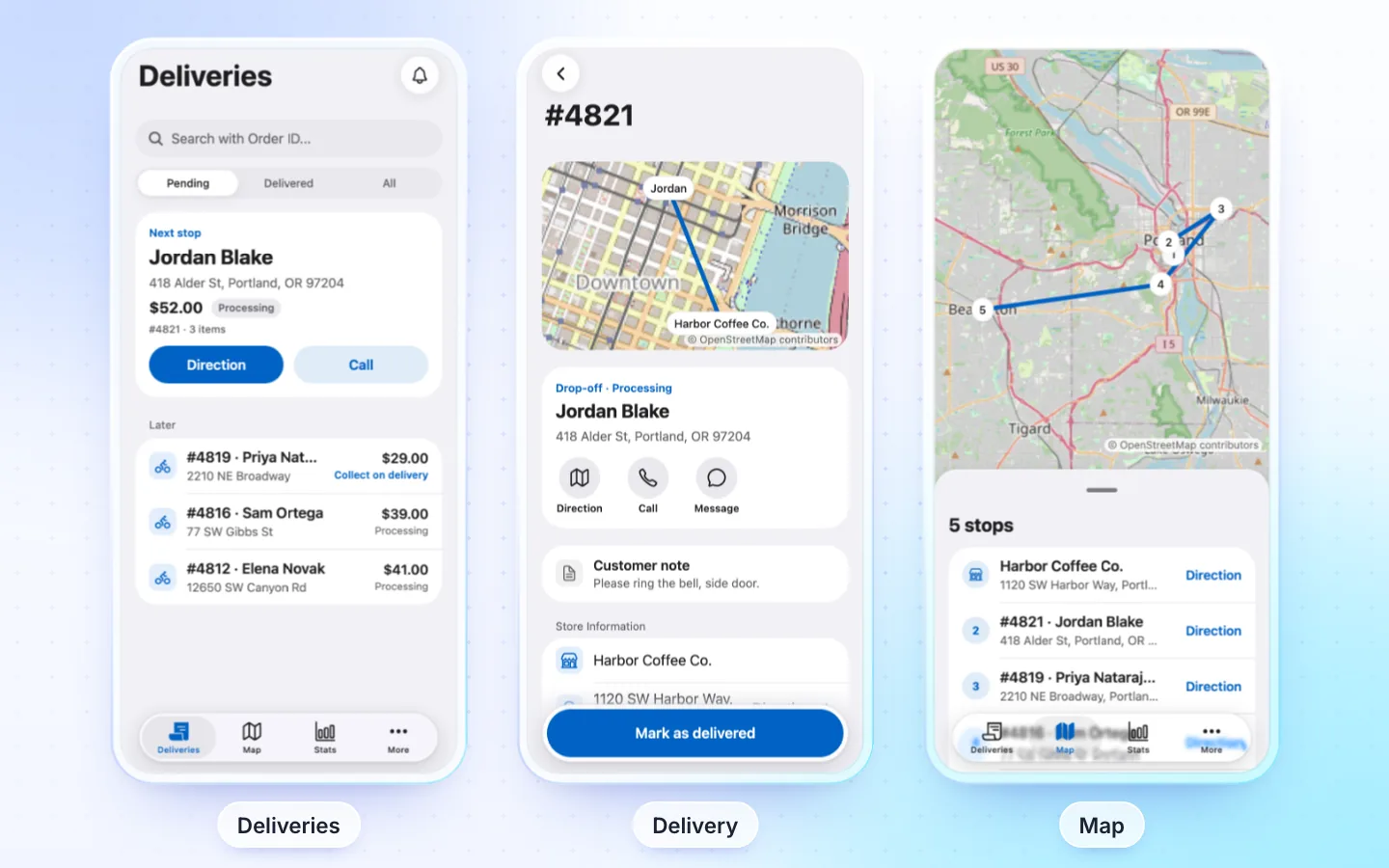
What drivers get
- Today: Online on or off, the delivery the driver is on with its next step, and the day's delivered, cash collected and failed deliveries.
- Deliveries: pending, delivered, failed and all orders, the step each is at, the one on its way first, with search by order number.
- An order: its progress (Picked up, Arrived, Delivered), the customer and address with Direction, Call and Message (quick texts: on my way, arrived, running late), the items, the store and the amount to collect on delivery.
- Complete delivery: the cash received (confirmed at the door; a different amount goes in the order's notes), where the order was left, proof of delivery (photos and the customer's signature) and a note. Owners make the photo or signature optional, required or off (
apps.driver.proofinsrc/config/apps.ts). - Proof stays private: photos and signatures are kept on your site, outside the media library, with no public link. Only the driver, your shop managers and the order's seller open them, from the order's Proof of delivery box or its notes. They go with the order when it is deleted, and in WordPress' Export and Erase Personal Data tools.
- Can't deliver: a reason (your plugin's own reasons, or the app's), a photo and a note. The store sees them and can send the order out again: Deliver again.
- Map: the day's stops. Direction opens the phone's maps app.
- Stats: today, the last 7 or 30 days: delivered, failed, cash collected, earnings where your plugin keeps them, the success rate and a bar a day; then the counts.
- More: the profile with the vehicle and plate, push notifications, languages, sign out and delete account.
Required plugins
| Plugin | Needed | What for |
|---|---|---|
| WooCommerce | Required | The store's orders |
| Local Delivery Drivers for WooCommerce or WCFM Delivery | Required | Drivers and the orders assigned to them: Local Delivery Drivers on WooCommerce or Dokan, WCFM Delivery on WCFM |
| FluxNative | Recommended | Deliveries, status, stats and the Online switch |
Driver accounts with the plugin's driver role. The store, or a seller in the seller app, assigns orders to them.
How it connects
Live from your site through its REST API and the FluxNative plugin. A driver app has no AI assistant or messages. Install the plugin later and the app moves to it at its next start; drivers sign in once more.
Supported plugins
| Plugin | Store | In the app |
|---|---|---|
| Local Delivery Drivers for WooCommerce | WooCommerce, Dokan | Every step, its failure reasons and drop-off places, the vehicle, earnings (its premium commissions), the Online switch |
| Delivery Drivers for WooCommerce (older, closed on wordpress.org) | WooCommerce, Dokan | Every step and the Online switch; a failed delivery where the store has its Order returned status |
| WCFM Delivery | WCFM | Complete delivery (no picked up or failed: the plugin keeps neither), the stores' pickups on the map; no Online switch. When one order is split among drivers, each sees and collects only their part: their items with tax, and a seller's shipping or an order fee once, by the driver of that seller's (or the order's) first item |
Not supported
- Picked up, arrived, failed, proof of delivery, the cash note, the vehicle and Stats by day need the FluxNative plugin. Without it the app offers Complete delivery only, and asks nothing it cannot keep: no amount, drop-off place or note.
- Live tracking of drivers on a map and route planning: drivers open each stop in their maps app.
- Driver apps for Shopify or a directory.
Turn it on in the store app
FluxBuilder (vendorConfig) | The app (src/config/apps.ts) | What it does |
|---|---|---|
DisableNativeDeliveryManagement: false | driver.enabled | Drivers open their deliveries in the app |
DeliveryRegister: true | driver.signUp | Sign Up's Register as offers Delivery Boy |
- A migrated FluxBuilder app takes these from its
env.dart. A store or marketplace from the template has the driver area off. - An app keeps only the areas that were on when it was made: with the driver area off it has no driver code, and it can't be turned on later. Make a driver app for it.
- Add Delivery (
delivery) to the Profile rows (src/config/account.tssettings). A signed-in driver then sees it in Profile.
Its own driver app
A site's shopper app, seller app and driver app are apps of the same website, so they use the same site: no other purchase.
- From FluxBuilder: a Delivery (
delivery) app migrates as a driver app. Choose Create app › From a FluxBuilder app and upload its files. - From the template: choose Create app › Start from the template, then Driver app, its plugin and your store's address.
The driver app opens on sign in, then shows its own tabs.
Related
Did this page help?